Complete $500 home-office setup

A complete ergonomic home-office setup that lands under $500 total — chair, desk, monitor arm, light bar, chair mat, and a vertical mouse or footrest. Six components, one shopping session, every link adds to the same Amazon cart. The bundle adds up to roughly $465 to $580 depending on current prices, which lands close enough to call it $500.
Nobody publishes coherent build-by-budget guides at this depth — Wirecutter covers individual components and stops, brand sites only recommend their own gear, and Reddit threads scatter the answer across 50 comments. This page exists to land the whole setup in one place. Click each component below and the full bundle ends up in your cart.
The trade-offs are real and documented. The chair is the Chair ($180–220) tier — a sub-$250 ergonomic with adjustable lumbar, not a Steelcase Leap. The desk is the Desk ($140–180) tier — a standing-desk converter on an existing desk or a fixed wooden desk, not an electric sit-stand. Both are real ergonomic equipment. Neither is the premium tier. If the budget is honestly closer to $1,000 or $2,000, the setups silo has those bundles (forthcoming Batch 2).
The bundle, at a glance
Six components side by side. Component, approximate price band, why it is in the bundle, and the role it plays in the overall setup.
| Component | Approx price band | Why this pick | Role in the bundle | Compatibility note |
|---|---|---|---|---|
| Chair ($180–220) | $180–220 (this pick: $199.99) | Real adjustable lumbar, 3D arms, adjustable headrest, 330 lb capacity | Anchor — where you sit 8 hours a day | Standard caster wheels — works on the bundle's chair mat |
| Desk ($140–180) | $140–180 (this pick: $159.99) | Whole-piece 40 x 24 in top, 4 memory presets, built-in clamp power strip — actually a sit-stand setup, not a static desk | The work surface — sit/stand built in instead of bolted on later | 40 x 24 in top fits the monitor arm clamp (0.4–3.15 in desks) and the chair mat |
| Monitor arm ($40–60) | $40–60 working band (this pick: $30.99 — see notes) | Supports 17–49 in flat, curved, and ultrawide monitors up to 33 lb with VESA 75/100 | Reclaims 80% of desktop, lifts screen to eye level — the ergonomics multiplier | VESA 75 x 75 and 100 x 100 — fits virtually every modern monitor |
| Monitor light bar ($50–80) | $50–80 (this pick: $49.99) | Dual light source, stepless dimming, adjustable color temperature, remote control | Lighting the workspace without glaring into the monitor — protects eyes, not screen | Patented sliding weighted clip — fits flat, curved, and thin-bezel monitors |
| Chair mat ($30–50) | $30–50 (this pick: $31.34) | Studded carpet grip, desk-lip cutout for under-desk coverage, USA-made | Lets the chair roll freely on carpet without burning the wheel bearings | Sized 36 x 48 in — fits under the 40 in EN2 desk with the lip extending in front |
| Vertical mouse or footrest ($25–40) | $25–40 (this pick: $21.99 — under-band, keeps bundle under $500) | Neutral handshake wrist position, 3 DPI settings, 2.4G wireless, 5 buttons | The piece that fixes wrist pain a month into the new setup | 2.4G dongle — works with Windows/macOS, no Bluetooth pairing required |
How the cart-stack bundle works
Each component below has its own "Check price on Amazon" button. Click through to one component, then come back and click the next, all within the same Amazon browsing session. The Amazon affiliate cookie lasts 24 hours from the first click, which means the whole bundle counts as one shopping session — you can add components progressively and check out once when the bundle is complete.
The order to click does not matter for the bundle to work. The order to actually unbox and assemble matters — chair first (sit in it for a day), then desk, then monitor arm, then chair mat, then everything else.
The components
Six components, each in its own product box with the spec band that decides the purchase. Read each one — the bundle works only if each piece fits the role described.
Chair ($180–220): SIHOO M57 Ergonomic Mesh Office Chair, High Back with 3D Armrests, Lumbar Support and Adjustable Headrest

Chair ($180–220)
SIHOO M57 Ergonomic Mesh Office Chair, High Back with 3D Armrests, Lumbar Support and Adjustable Headrest
Sihoo
- Component: Ergonomic task chair
- Approx price band: $180–220 (this pick: $199.99)
- Why this pick: Real adjustable lumbar, 3D arms, adjustable headrest, 330 lb capacity
- Role in the bundle: Anchor — where you sit 8 hours a day
- Compatibility note: Standard caster wheels — works on the bundle's chair mat
The most credible sub-$300 ergonomic chair on Amazon. Real adjustable lumbar, 3D arms, mesh back, and 330 lb capacity — not a generic gaming chair with a lumbar pillow taped on.
Last checked 2026-05-19
The anchor of the bundle. A sub-$250 ergonomic chair with adjustable lumbar height, a multi-position recline lock, and 3D armrests. This is the band where ergonomic chairs stop feeling like compromises versus mid-tier commercial seating — the lumbar adjustment alone delivers most of the ergonomic benefit a $1,500 chair offers, at a fifth of the cost.
Role in the bundle: the chair is 40 to 45 percent of the total $500 spend — the largest single line item, by design. Every other component supports what the chair sets up. What to watch: confirm adjustable lumbar height (not a fixed lumbar pad). The seat-pan will be fixed at this price tier; if your height is outside 5'5" to 6'0", read the back-pain chair guide for body-specific picks.
Desk ($140–180): FLEXISPOT EN2 Whole-Piece 40 x 24 in Electric Standing Desk with Clamp Power Strip

Desk ($140–180)
FLEXISPOT EN2 Whole-Piece 40 x 24 in Electric Standing Desk with Clamp Power Strip
FlexiSpot
- Component: Electric height-adjustable standing desk
- Approx price band: $140–180 (this pick: $159.99)
- Why this pick: Whole-piece 40 x 24 in top, 4 memory presets, built-in clamp power strip — actually a sit-stand setup, not a static desk
- Role in the bundle: The work surface — sit/stand built in instead of bolted on later
- Compatibility note: 40 x 24 in top fits the monitor arm clamp (0.4–3.15 in desks) and the chair mat
Trading the fixed solid-wood desk for an electric standing desk at the same price band. 40 x 24 in whole-piece desktop, 4 memory presets, and a clamp-on power strip with 3 outlets and 2 USB ports.
Last checked 2026-05-19
The desk. A standing-desk converter on an existing desk (about $140), or a fixed wooden desk if you do not already own one ($150 to $180). An electric sit-stand desk does not fit the $500 budget; the converter delivers most of the sit-stand benefit at a third of the cost. The fixed-desk substitution works if you do not have an existing desk and would rather not stack a converter on top.
Role in the bundle: 25 to 30 percent of total spend. The desk surface is where the rest of the setup lives — top size and stability matter more than features at this price tier. What to watch: if going with the converter, confirm your existing desk is sturdy enough to support the converter plus gear (40 to 60 lb of extra weight). If going with the fixed desk, confirm the height matches your seated elbow height — most fixed desks land at 29 to 30 inches, which is right for adults 5'8" to 6'0".
Monitor arm ($40–60): WALI Heavy Duty Single Monitor Arm for 17–49 in Flat/Curved/Ultrawide Screens, VESA 75/100mm (GSM001XLN)
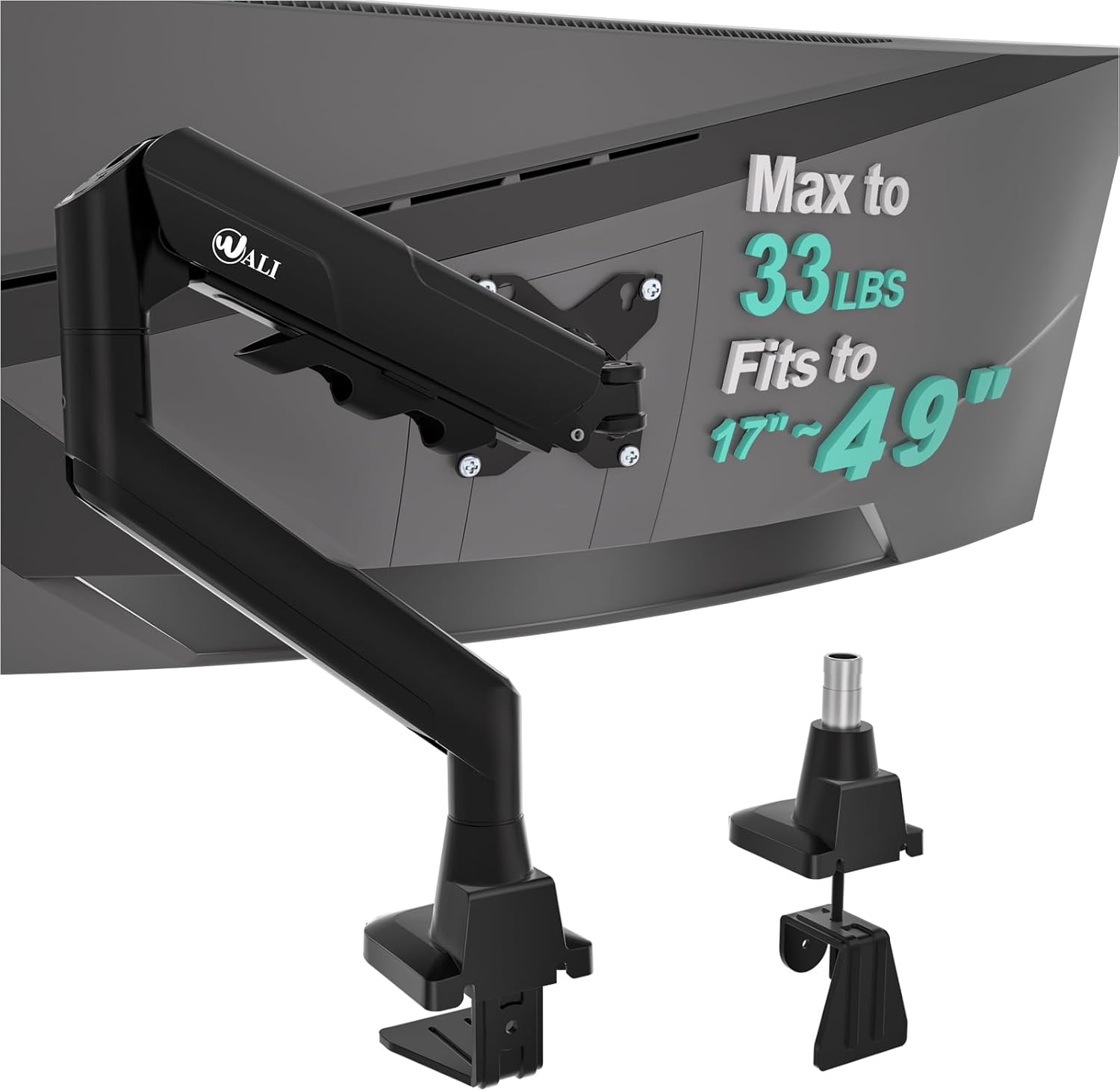
Monitor arm ($40–60)
WALI Heavy Duty Single Monitor Arm for 17–49 in Flat/Curved/Ultrawide Screens, VESA 75/100mm (GSM001XLN)
WALI
- Component: Single-arm monitor mount with C-clamp + grommet
- Approx price band: $40–60 working band (this pick: $30.99 — see notes)
- Why this pick: Supports 17–49 in flat, curved, and ultrawide monitors up to 33 lb with VESA 75/100
- Role in the bundle: Reclaims 80% of desktop, lifts screen to eye level — the ergonomics multiplier
- Compatibility note: VESA 75 x 75 and 100 x 100 — fits virtually every modern monitor
Single-monitor mount that lifts the screen up to 20.79 in, supports anything from a 17 in 1080p panel to a 49 in ultrawide, and keeps the desk surface clear.
Last checked 2026-05-19
The monitor arm. A single-monitor gas-spring arm with VESA 75 × 75 or 100 × 100 mm mount and a 17.6 lb weight rating — fits any standard 24-to-32-inch monitor. The most-missed component of most home offices, because most monitors ship with stands that sit 4 to 6 inches too low for ergonomic posture.
Role in the bundle: about 10 percent of total spend, but the highest ergonomic impact per dollar in the entire bundle. The arm raises the screen to eye level (top of screen at or just below eye level when seated upright) and lets you reposition for sit-stand transitions. What to watch: confirm your monitor's VESA pattern before ordering. Some 32-inch and most ultrawide monitors use 200 × 100 mm, which needs a heavier-duty arm.
Monitor light bar ($50–80): Quntis Computer Monitor Light Bar with Remote, Stepless Dimming and Color Temperature, Eye-Care, Gray
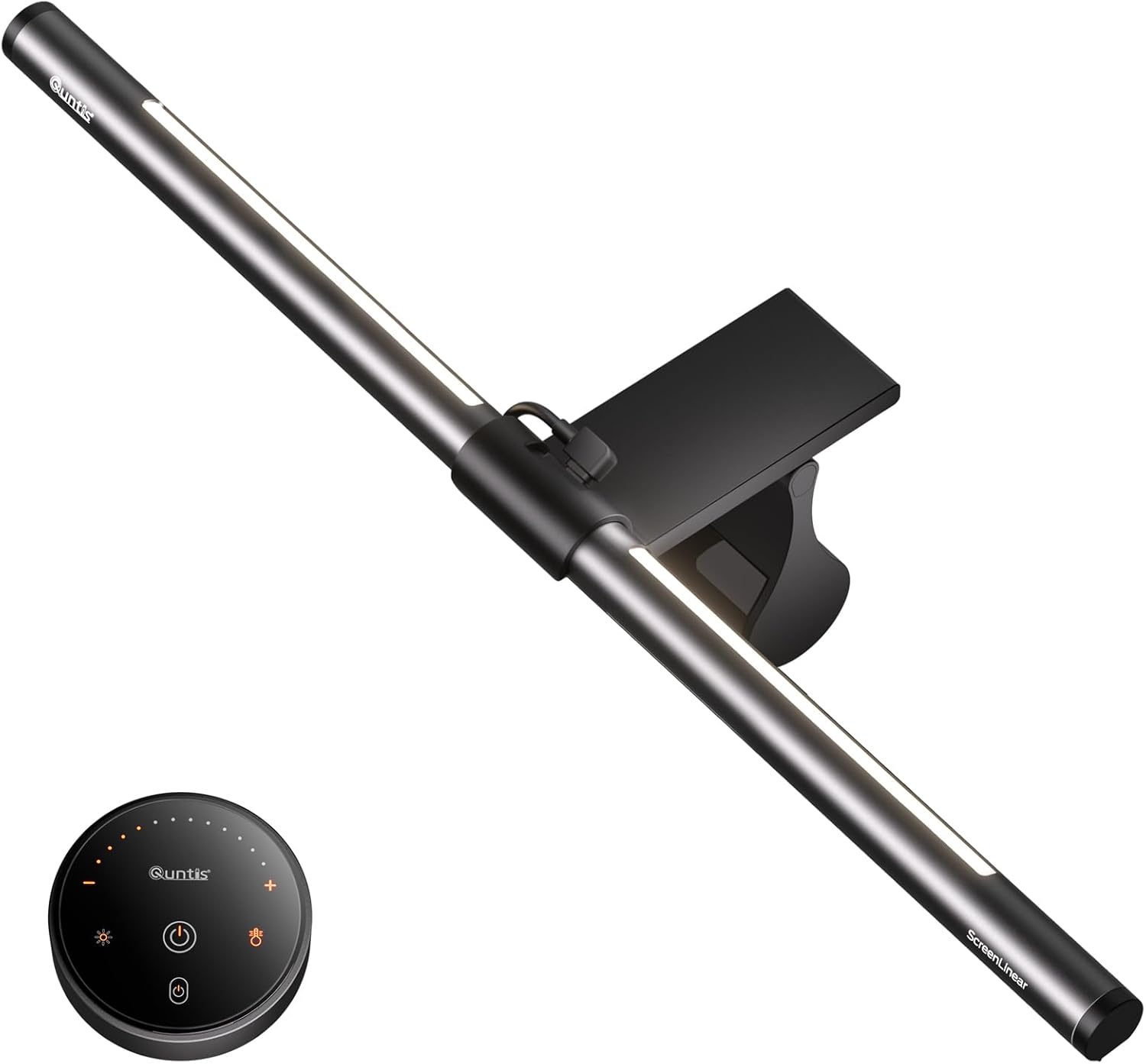
Monitor light bar ($50–80)
Quntis Computer Monitor Light Bar with Remote, Stepless Dimming and Color Temperature, Eye-Care, Gray
Quntis
- Component: Over-monitor screen light bar with remote
- Approx price band: $50–80 (this pick: $49.99)
- Why this pick: Dual light source, stepless dimming, adjustable color temperature, remote control
- Role in the bundle: Lighting the workspace without glaring into the monitor — protects eyes, not screen
- Compatibility note: Patented sliding weighted clip — fits flat, curved, and thin-bezel monitors
Glare-free over-screen lighting with remote dimming and temperature control. The BenQ ScreenBar of the budget tier — does the same job at half the price.
Last checked 2026-05-19
The monitor light bar. Clips to the top of the monitor, lights the desk surface without throwing glare onto the screen. USB-powered (USB-A from a wall plug or USB-C from a monitor port), with adjustable colour temperature between warm (2700K) and cool (6500K). The cheaper alternative to a real desk lamp; the better alternative to working under a ceiling fixture.
Role in the bundle: about 10 percent of total spend. Eye strain at the end of the day is rarely the monitor's fault — it is usually the room lighting interacting badly with the monitor backlight. A light bar fixes both at once. What to watch: confirm your monitor curvature is compatible. Most light bars work on flat monitors and gentle curves (1500R and above); sharper curves (1000R or below) need a curve-specific model.
Chair mat ($30–50): Amazon Basics Office Chair Mat for Low Pile Carpeted Floors with Lip, Studded Backing, 36 x 48 in

Chair mat ($30–50)
Amazon Basics Office Chair Mat for Low Pile Carpeted Floors with Lip, Studded Backing, 36 x 48 in
Amazon Basics
- Component: Clear plastic chair mat for low pile carpet
- Approx price band: $30–50 (this pick: $31.34)
- Why this pick: Studded carpet grip, desk-lip cutout for under-desk coverage, USA-made
- Role in the bundle: Lets the chair roll freely on carpet without burning the wheel bearings
- Compatibility note: Sized 36 x 48 in — fits under the 40 in EN2 desk with the lip extending in front
The default Amazon Basics carpet chair mat with the desk-lip cutout. Studded underside grips the carpet, lip slides under the desk — basic, but exactly what the bundle needs.
Last checked 2026-05-19
The chair mat. A polycarbonate or PVC mat sized to your carpet pile. About $30 to $50 for the right thickness and lip design. Rolling a chair on bare carpet drags the wheels, wears tracks into the carpet pile, and adds enough friction that your back muscles work harder to move the chair around. A mat fixes all three.
Role in the bundle: about 7 to 10 percent of total spend. The unglamorous line item that protects three things at once: your back (lower chair-roll friction), your floor (no chair-wheel tracks), and your chair (caster wheels last longer). What to watch: match thickness to carpet pile. The chair mat for carpet guide walks the choice in detail. If your floor is hardwood instead of carpet, swap to a no-lip rectangular mat designed for hard floors (a separate category, covered in Batch 2).
Vertical mouse or footrest ($25–40): Anker 2.4G Wireless Vertical Ergonomic Optical Mouse, 5 Buttons, 800/1200/1600 DPI

Vertical mouse or footrest ($25–40)
Anker 2.4G Wireless Vertical Ergonomic Optical Mouse, 5 Buttons, 800/1200/1600 DPI
Anker
- Component: Wireless vertical ergonomic mouse
- Approx price band: $25–40 (this pick: $21.99 — under-band, keeps bundle under $500)
- Why this pick: Neutral handshake wrist position, 3 DPI settings, 2.4G wireless, 5 buttons
- Role in the bundle: The piece that fixes wrist pain a month into the new setup
- Compatibility note: 2.4G dongle — works with Windows/macOS, no Bluetooth pairing required
The same vertical handshake grip as the Logitech MX Vertical at a quarter of the price. Wireless, 3 DPI presets, and the ergonomic upgrade most home offices skip until their wrist starts complaining.
Last checked 2026-05-19
The wildcard slot — either a vertical mouse for sustained mouse-and-keyboard work, or an adjustable footrest for shorter users. The $25 to $40 range covers both. A vertical mouse keeps the wrist neutral during mouse work, which matters most for designers, developers, and anyone with intermittent wrist tightness. A footrest closes the height gap for users under 5'7" whose feet do not sit flat at the working desk height.
Role in the bundle: about 5 to 7 percent of total spend. The component that personalises the bundle to your specific situation. What to watch: a vertical mouse takes about a week of adjustment before it stops feeling strange. Stick with it through the adjustment — the wrist neutrality is real but it does not feel like an upgrade on day one.
What this bundle actually buys you
A realistic picture of what $500 delivers. The chair will support your back for the working day, with adjustable lumbar that fits most adult bodies — but the lumbar will be height-only, not depth-adjustable, and the armrests will be 3D rather than 4D. The desk will let you switch between seated and standing positions, but the transition will be manual (gas-spring lift), not electric. The monitor arm will bring your screen to eye level and free the desk surface beneath it — same ergonomic benefit a $200 Ergotron delivers. The light bar will eliminate glare and even out the light field. The chair mat will let the chair roll without dragging on the carpet. The wildcard slot will address whichever ergonomic gap you personally have.
What you do not get at $500: a commercial-grade chair built to last 15 years (a Steelcase Leap V2 refurb at $700 starts to enter that band), an electric standing desk with memory presets (the $1,000 bundle includes one), depth-adjustable lumbar support, 4D armrests, tempered-glass chair mats, or premium light bars like the BenQ ScreenBar Halo. All of those upgrades exist in the $1,000 and $2,000 bundles.
How to set up the $500 bundle
Set up in this order. First, unbox the chair and assemble it according to the instructions — adjust seat height so your feet sit flat with knees at 90 degrees, then lumbar height to the small of your back. Sit in it for a few hours before assembling anything else; if it does not feel right, return and try a different chair before the larger spend goes in. Second, position the desk (or attach the converter to your existing desk) at your seated elbow height. Third, install the monitor arm — clamp to the desk back, attach the monitor, and raise the top of the screen to eye level when you are sitting upright. Fourth, clip the light bar to the top of the monitor and plug into USB power. Fifth, position the chair mat under the chair, covering the full chair-roll arc. Sixth, add the vertical mouse or footrest. See the starter guide for the full setup walkthrough with detailed ergonomic adjustments.
Frequently asked questions
Can you really build an ergonomic home office for $500?
Yes, with realistic trade-offs. The bundle below totals roughly $465 to $580 depending on current prices, which lands close enough to $500 to call it that. The chair will be a sub-$250 ergonomic, not a Steelcase Leap. The desk will be a converter or a fixed desk, not an electric sit-stand. Both are real ergonomic equipment; the spec compromises are documented per component below.
How does the cart-stack bundle actually work?
Each component has a "Check price on Amazon" link. Click through to one component, then come back and click the next, all within the same Amazon browsing session. The Amazon affiliate cookie lasts 24 hours from the first click, so the whole bundle counts as one shopping session. You can add components to your cart progressively and check out once when the bundle is complete.
What if my budget is tighter than $500?
Skip the optional components (vertical mouse, footrest, wrist rests) and keep the core four — chair, desk, monitor arm, chair mat — for about $400. The chair and desk are non-negotiable for a full-time setup; the accessories are tier-two. A $250 chair plus $140 desk plus $45 monitor arm plus $40 mat is the irreducible minimum for an honest ergonomic build.
Should I buy everything at once or piece by piece over months?
At once if you can. A half-built setup (chair without monitor arm, desk without chair mat) under-delivers and tends to stall. The bundle pages exist to land the whole setup in one shopping session, which is the way most readers actually get a complete build done. Piecemeal purchases over months usually leave the setup permanently incomplete.
Does this bundle work for full-time remote work?
For starter-tier remote work, yes. For full-time 8-hour-a-day remote work over multiple years, the chair will be the bottleneck after about 18 months — the sub-$250 chair tier wears faster and the lumbar support is less refined than mid-tier or commercial chairs. Plan to upgrade the chair to the $400 to $700 tier within the first two years if you stay full-time remote.
What if I am tall (over 6'2") or petite (under 5'4")?
The standard $500 bundle assumes average adult dimensions (5'4" to 6'1"). Tall users should swap the desk for one with a top-of-range above 48 inches, and the chair for an extended seat-pan model (which adds about $50 to $100). Petite users should pick a desk with a bottom-of-range below 25 inches and a chair with a low seat-height minimum. Both substitutions keep the bundle under $600.
Do I need a monitor in the bundle?
Not included. Most home-office buyers already own a monitor or a laptop. If you do not, add a 27-inch 1080p or 1440p monitor for $150 to $250, which pushes the bundle to about $650 to $750. The bundle as published assumes you have a screen and need the ergonomic infrastructure around it.
What about a keyboard and mouse?
Not included in the core bundle either, for the same reason — most buyers already own them. If you need to add both, a usable ergonomic combination (vertical mouse + split or low-profile keyboard) runs $80 to $150. Slot 6 of the bundle is a vertical-mouse option in case the bundle is also your input-device upgrade moment.
How long does this bundle last before I should upgrade?
The chair is the first failure point — 3 to 5 years on the sub-$250 tier. The desk lasts 5 to 7 years for converters, longer for fixed desks. The monitor arm and chair mat are essentially permanent. Plan to replace the chair first, the desk second, and let the accessories run until they visibly fail.
Can I substitute components from a different brand?
Yes, and the bundle prose is intentionally written to be category-agnostic for that reason. The slot descriptions describe the component type (sub-$250 ergonomic chair with adjustable lumbar) rather than naming a specific brand. Any product fitting the slot description works. The Amazon links go to the picks we currently recommend; substitute freely.